AI Packaging Design Generator: How It Works and When to Use One
An AI packaging design generator turns a text prompt or reference image into packaging artwork or a 3D mockup in seconds. What it doesn't reliably do is produce a structurally sound, print-ready file a manufacturer can cut, fold, and glue. That gap between "looks right on screen" and "works as a physical object" is the single thing to understand before using one of these tools for anything beyond early-stage exploration.
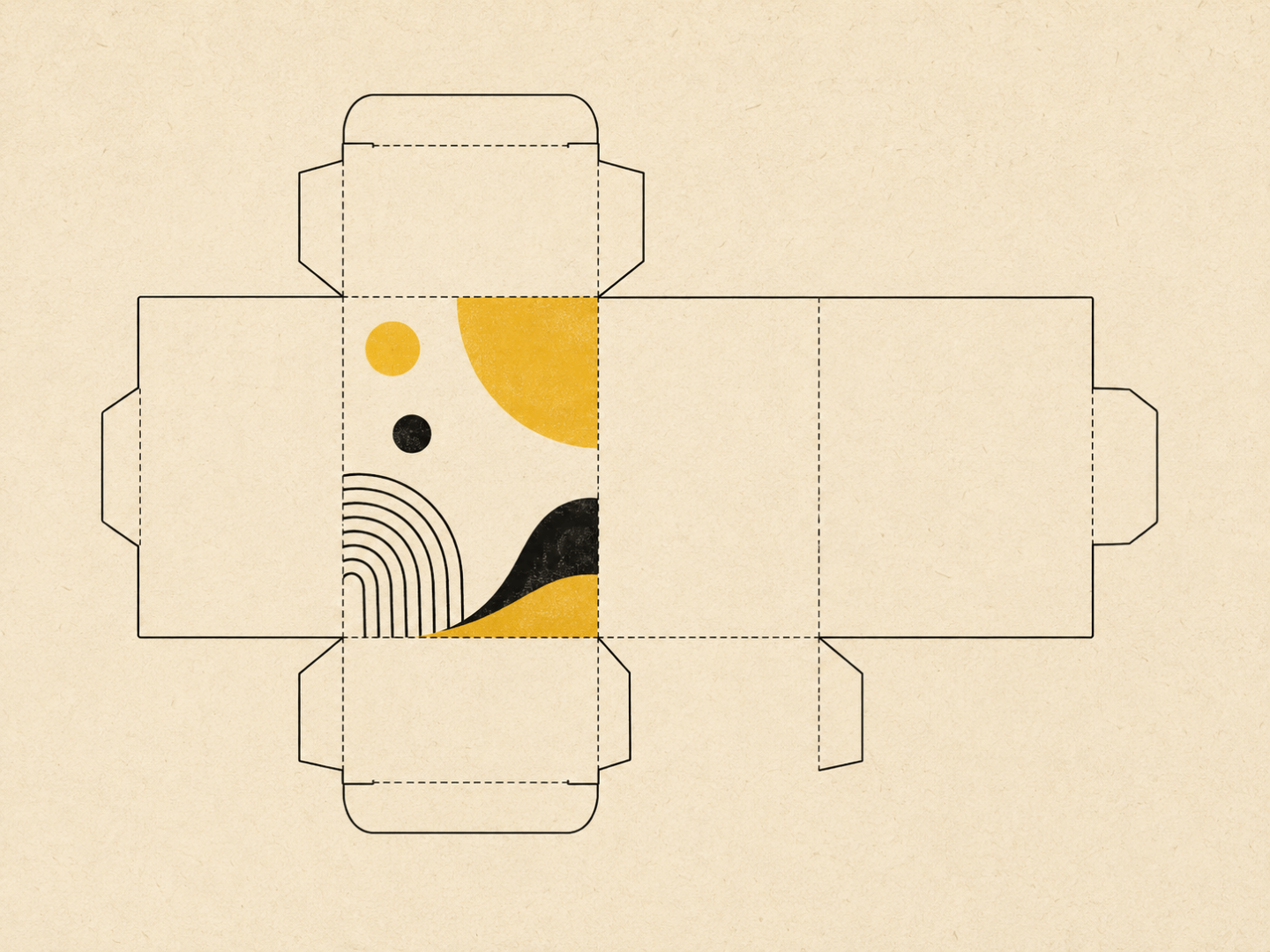
Packaging is a different discipline to most other design work AI tools handle well. A logo or a social tile is a flat graphic. A box, pouch, or bottle label has to account for dielines, print bleed, fold tolerances, material behaviour, and how a flat sheet becomes a three-dimensional object without the artwork breaking across a seam. Text-to-image AI can generate something that looks like packaging. It can't calculate whether that packaging will actually fold correctly.
- General-purpose text-to-image tools (Midjourney, DALL-E, Canva Magic Studio) generate packaging visuals but produce flat raster images with no dieline, no fold lines, and no CMYK-ready file, useful for mood and direction only.
- Packaging-specific AI tools (Pacdora, Packify, and similar) go further and generate mockups against real dieline templates, but the structural output still needs a human packaging designer to verify die-cut tolerances, glue tabs, and print registration before it goes to a manufacturer.
- AI packaging generators are genuinely useful for early concept exploration and for giving a packaging designer a clear starting brief, not for replacing the structural design stage.
- The risk with packaging specifically is higher than with most other AI design use cases: a file that looks correct on screen but doesn't work as a die-cut can mean a wasted print run, not just a rough first draft.
- The sensible workflow is AI for direction and mood, then a qualified packaging designer for structure, dielines, and anything heading to print.
What AI packaging design generators actually do
Two categories of tool sit under this label, and they're not the same thing.
The first is general-purpose text-to-image tools being used for packaging, the same models people reach for when generating any other AI image. Describe a kraft box with botanical illustrations or a sleek two-tone bottle, and the tool returns a photorealistic render. These are genuinely good at mood, colour direction, and early creative exploration. They're also, by design, image generators rather than packaging engines: the output is a flat picture of packaging, not a file with any structural logic behind it. On-pack text has historically been a weak point for these models too, so treat any generated copy or nutritional panel as placeholder only, never as something to lift into production artwork.
The second category is packaging-specific platforms built around real dieline libraries and 3D mockup engines. These tools let a user select a packaging format, box, pouch, bottle, then generate design variations against that structure, with some claiming to output an accompanying dieline file alongside the visual. This is a meaningfully different proposition to a general-purpose image generator, because the mockup is at least anchored to a real structural template rather than an AI's best guess at what a box looks like.
Both categories are worth knowing about. Neither replaces the next section.
The physical constraint problem
This is the part that matters most for packaging specifically, more than for almost any other design category an AI tool touches.
A dieline is the flat, unfolded template that shows a manufacturer exactly where to cut, score, and fold a sheet of material into a finished box or container. It accounts for material thickness, fold tolerances, glue tab placement, and how panels need to align once assembled. Getting a dieline wrong doesn't produce a slightly-off design. It can produce a box that physically doesn't close, artwork that wraps around the wrong edge, or a print run that has to be scrapped and redone.
Even packaging-specific AI tools that generate dielines alongside their visuals are producing a structural starting point, not a verified production file. Panel proportions and fold angles generated from standard formulas will often be in the right ballpark for common formats like tuck-end or mailer boxes. They still need a human packaging designer to check die-cut tolerances, confirm the file works for the specific printer and substrate being used, and catch anything that only becomes obvious once you're working with real material rather than a render. General-purpose text-to-image tools don't produce dielines at all, so for those, the entire structural stage still has to happen from scratch with a designer.
This is the one place in AI-assisted design where overselling the tool has a real physical cost. A logo that needs a second pass is an inconvenience. A packaging file that looks right in a render but doesn't fold correctly is a wasted print run and a delayed launch.
What these tools are genuinely useful for
Used at the right stage, AI packaging generators solve a real problem: the slow, expensive early phase of packaging development where a brand is still figuring out direction before committing budget to a designer.
Concept exploration is the strongest use case. Generating a dozen visual directions in an afternoon, luxury minimal versus bold colour-forward versus eco kraft, gives a brand or founder something concrete to react to before any brief is written. That reaction (what feels right, what feels wrong, what's closer to the shelf presence they want) is exactly the information a packaging designer needs to start real work efficiently.
Mood and direction ahead of a brief is the second strong use case. Instead of a brief that says "modern and premium," a founder can hand a packaging designer three or four AI-generated directions and say "closer to this, not that." It shortens the discovery phase of a real design engagement, which is one of the more genuinely useful applications of AI across design work broadly. The same principle applies to briefing any designer well, not just a packaging specialist, see our guide on how to brief a graphic designer for the underlying approach.
Internal stakeholder and investor visuals are a reasonable secondary use. A polished-looking render for a pitch deck or an internal concept review doesn't need to be production-accurate, it needs to communicate a direction. This is a legitimate use of the tools that doesn't carry the same risk, because nothing generated at this stage is going anywhere near a printer.
What these tools can't do
Structural packaging design is the core gap. Designing a box, pouch, or bottle that opens, closes, protects its contents, and survives shipping is an engineering problem as much as a visual one. AI tools working from prompts or standard formulas don't account for the specific product going inside, shipping conditions, or the particular printer and substrate a brand is using.
Print-ready file production is the second gap, and the one most likely to cause an expensive mistake. A file that's genuinely ready for a manufacturer needs correct CMYK colour, accurate bleed and safe zones, verified die-cut tolerances for the specific press and material, and often Pantone matching for brand colours that need to be exact. None of the categories of AI tool covered here should be treated as a substitute for that verification, even the ones that generate an accompanying dieline.
Packaging that needs to meet regulatory requirements, food contact compliance, nutritional panel placement, allergen warnings, barcode positioning, sits further outside what any of these tools handle reliably. That's a compliance question for a packaging designer or regulatory consultant, not a prompt.
A sensible workflow
Use AI tools first, for direction. Generate a spread of concepts, narrow to two or three directions that feel right, and use those as a genuine visual brief rather than a vague written one.
Bring in a packaging designer for structure. Hand over the AI-generated direction along with the product's real dimensions, the intended material, and how it'll be manufactured. This is where the actual dieline, print-ready file, and structural soundness get built, by someone who can verify it against the specific press and substrate involved.
Treat anything AI-generated as reference, never as a final file. If a printer or manufacturer receives packaging artwork that originated from an AI tool without a human design pass in between, that's a signal to stop and get it reviewed before committing to a print run.
FAQs
- Can I use an AI packaging design generator to create a final, print-ready file?
- Not reliably. General-purpose text-to-image tools produce flat visuals with no dieline, bleed, or CMYK setup. Packaging-specific tools that generate an accompanying dieline still need a human packaging designer to verify die-cut tolerances and print specifications before the file goes to a manufacturer.
- What's the difference between a general-purpose AI tool and a packaging-specific one?
- General-purpose tools like Midjourney or Canva Magic Studio generate packaging visuals the same way they'd generate any other image, with no underlying structural template. Packaging-specific platforms anchor the design to a real dieline or mockup library for a chosen format, which gets closer to something usable but still isn't production-verified.
- Are AI packaging tools worth using at all if they can't finish the job?
- Yes, for the right stage. They're genuinely useful for early concept exploration and for giving a packaging designer a clear visual brief instead of a written description. The value is in speeding up direction-setting, not in replacing the structural design and production stages.
- What happens if I send AI-generated packaging artwork straight to a manufacturer?
- At best, the manufacturer flags issues and sends it back for revision, costing time. At worst, the file gets produced as submitted and the finished packaging doesn't fold, close, or print correctly, meaning a wasted run. Always route AI-generated concepts through a packaging designer before production.
If you're at the concept stage, our guide on how to brief a graphic designer covers how to turn AI-generated direction into a brief a professional can actually work from. For a comparison of purpose-built AI design generator products more broadly, see best AI design generators for logos and branding. Business card design shares the same production-constraint problem as packaging, on a smaller scale, worth a look in our business card design guide if print specifications are new territory. And for a wider list of design tools we rate, see useful design tools. More on how Design Junction approaches AI and design content is on our About page.